
Bookings · Smart locks
Open 24/7
without a front desk
For gyms, studios, meeting rooms and rented spaces where nobody can sit by the door all day. Every booking gets its own lock code, the customer receives it by e-mail, and it stops working when the slot ends.
- The code is valid only for the booking
- A backup code when the lock is not responding
- Alerts for low battery and gateway outages
No credit card. Up and running in 5 minutes.
- 4 8 1 9 0 3Booking Tomáš Beneš · Thu 6:00–7:305:59–7:35Active
- 7 2 0 5 5 8Booking Lucie Horáková · Thu 18:00–19:0017:59–19:05Upcoming
- 3 3 6 1 4 7System backup codeuntil 8 DecBackup
- Battery 22 %Administrator alerted by e-mailtoday 6:12Replace
- TTLockTTLock locks connected to the internet through a gateway.
- A code per bookingEvery slot has its own code, removed from the lock afterwards.
- Backup codeIf issuing a code fails, the customer gets the backup and still gets in.
- Lock monitoringBattery, gateway availability and connection errors checked regularly.
Why locks in BizKitHub
Keys, front desks and one shared code do not scale
Self-service only works when the customer gets in exactly during their slot, and nobody else does.
Today
- Keys are handed over in person or left in a mailbox
- Everyone who has ever visited knows the shared code
- Codes are changed by hand in an app and sent by text message
- You learn about a flat battery from a customer at a locked door
With BizKitHub
- A code is created automatically for every booking
- It is valid just before the start and just after the end
- The customer gets it in the booking reminder e-mail
- Low battery and gateway outages are reported to the administrator
A code for every booking
A booking creates the code. The end of the slot revokes it.
When a calendar has a lock attached, every booking gets its own numeric code, pushed to the lock. It starts working a minute before the slot and stops five minutes after it ends. The window can be adjusted per lock.
- The code goes out in the booking reminder e-mail
- Moving a booking moves the code validity with it
- A watchdog checks bookings in the next 24 hours every few minutes
- Bookings without a working code show up in a risk overview
- Mon 10:14Booking paidOnline card payment
- Thu 16:58Code created and sent to the lockValid 17:59–19:05
- Thu 17:00Reminder with code sentE-mail to the customer
- Thu 17:56Unlocked with keypadSuccessful
- Thu 19:05Code expired
Case study · GymRoom
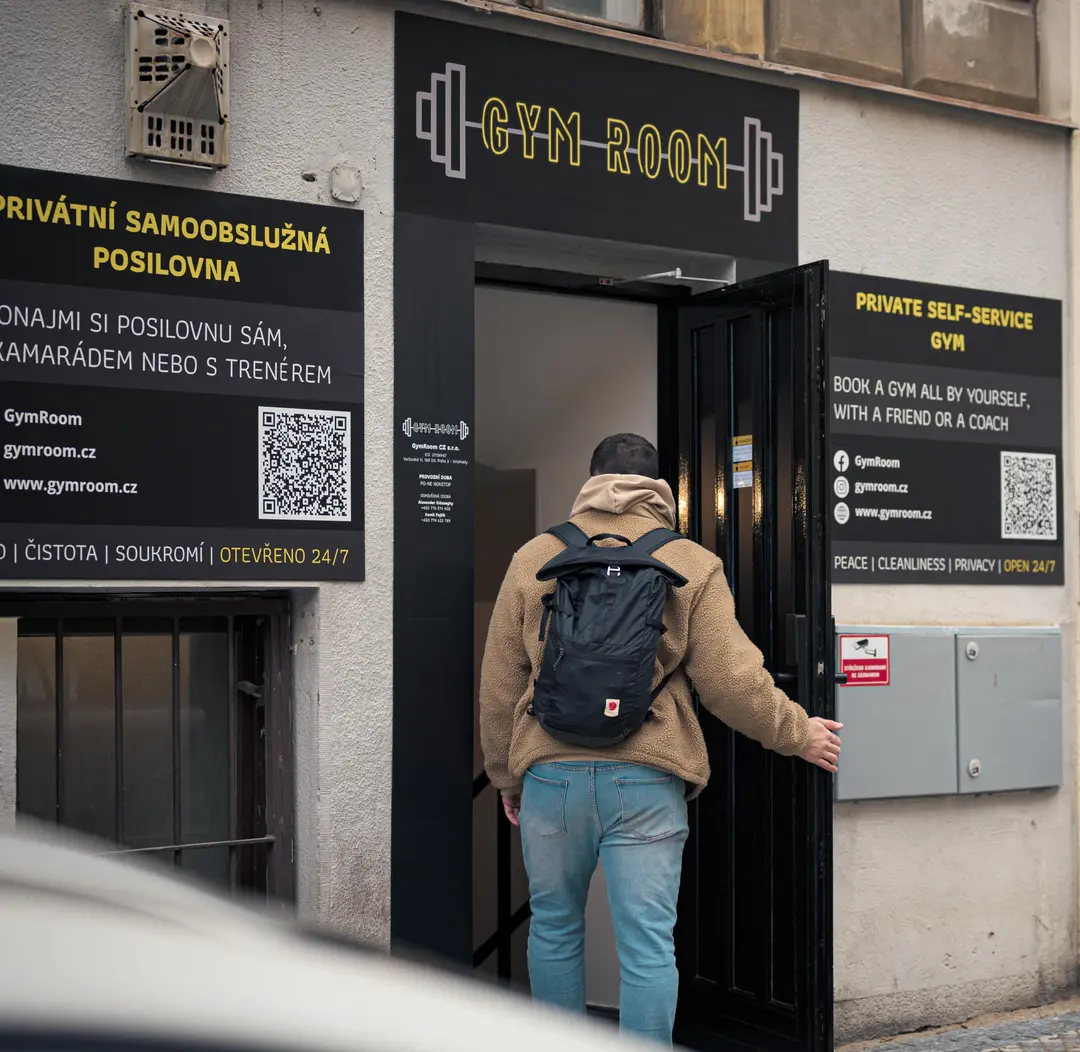
A private gym with nobody at reception
GymRoom runs self-service private gyms. Each client has the whole space to themselves for their slot, the gym runs 24/7 and no staff need to be on site. Access is handled by smart locks connected to bookings in BizKitHub.
- The client books a slot in the calendar and pays online by card
- An hour before the slot, the access codes arrive by e-mail
- Two-step entry: a security gate and the main door, each with a time-limited code
- The whole space belongs to one client for the duration of the booking
Lock monitoring
Know about a flat battery before your customer does
The system checks your locks regularly. It watches battery level, gateway availability and TTLock connection errors, and e-mails the lock administrator when something is off. In an emergency, the lock can be opened remotely.
- Alert below 25 % battery, critical below 10 %
- 30-day availability, outage history and mean time to recovery
- Unlock history: keypad, app, fingerprint, failed attempts
- Remote unlock from the admin or over the API
| Lock | Battery | 30-day availability | |
|---|---|---|---|
| Entrance Vinohrady | 22 % | 99.8 % | Low battery |
| Gate Vinohrady | 81 % | 99.8 % | Online |
| Meeting room Karlín | 64 % | 97.1 % | Online |
| Storage Smíchov | 9 % | 92.4 % | Critical |
What it does
Access that follows your bookings
A code per booking
A unique code for every slot, created and removed automatically.
Time window
Validity before the start and after the end, adjustable per lock.
Backup code
Renews itself and is used when issuing a new code fails.
Manual codes
Codes for cleaning, maintenance or a colleague with their own validity.
Remote unlock
One click in the admin, or a REST API call.
Unlock history
Who unlocked, when and how, including failed attempts.
Battery
Battery level over time and replacement alerts.
Availability and outages
Gateway online status, outages and 30-day availability.
Lock administrator
A contact who receives alerts about critical events.
Getting started
A lock in service in one afternoon
- 01
Connect TTLock
Enter your TTLock credentials. The connection is verified on save.
- 02
Add the lock
You find the lock ID in the TTLock mobile app.
- 03
Attach a calendar
Assign the lock to a booking calendar and codes start appearing on their own.
Who it is for
Wherever doors open without staff
Gyms and studios
Self-service sessions in the slot the client booked and paid for.
Meeting rooms and coworking
Rooms by the hour without handing over keys.
Space rental
Rehearsal rooms, studios and workshops open only during the rental.
Storage and pick-up points
Time-limited codes for couriers, cleaning or maintenance.
Connections
Hardware and systems the locks work with
- TTLock
- TTLock gateway
- Calendar and bookings
- Card payments
- E-mail reminders
- REST API
Connected modules
Runs on the same data as the rest of your company
Bookings
Online booking with payment and reminders.
Calendar
Team and personal calendars with invites and reminders.
Payment gateways
GoPay, Comgate and Stripe. Cards, transfers, recurring.
Notifications
Alerts for your team and customers at the right moment.
Monitoring
Oversight of cron jobs and errors, with alerts.
Frequently asked questions
Common questions about smart locks
Which locks are supported?
Keypad locks on the TTLock platform. Automatic codes, health checks and remote unlocking need the lock to be connected through a gateway.
What if the lock is not responding?
Every lock has a backup code that renews regularly. If a new code cannot be issued, the customer gets the backup. The system keeps retrying and alerts the administrator.
How long is a code valid?
By default from one minute before the booking starts until five minutes after it ends. The window can be adjusted per lock. Moving the booking moves the code validity too.
How does the customer get the code?
In the booking reminder e-mail. Codes are never written to logs or system notifications.
Can I give a code to someone without a booking?
Yes. In the lock detail you create a manual code with its own validity, for cleaning or maintenance for example.
Stay open when nobody is there
Create a free account, connect your TTLock lock and attach it to a booking calendar.